Test ESP32 sensing firmware side by side
Wavrel runs the MQTT hub your boards report to, gathers what they send in one console, and checks every detection against when someone really crossed. Simulated values and real measurements never mix.
The demo runs on the built-in simulator, with nothing to install. To connect boards, get the Windows desktop app.
- Two ESP32 boards and the Wi-Fi link between them
- The region the link senses (its Fresnel zones)
- Motion score and threshold
- Over the threshold
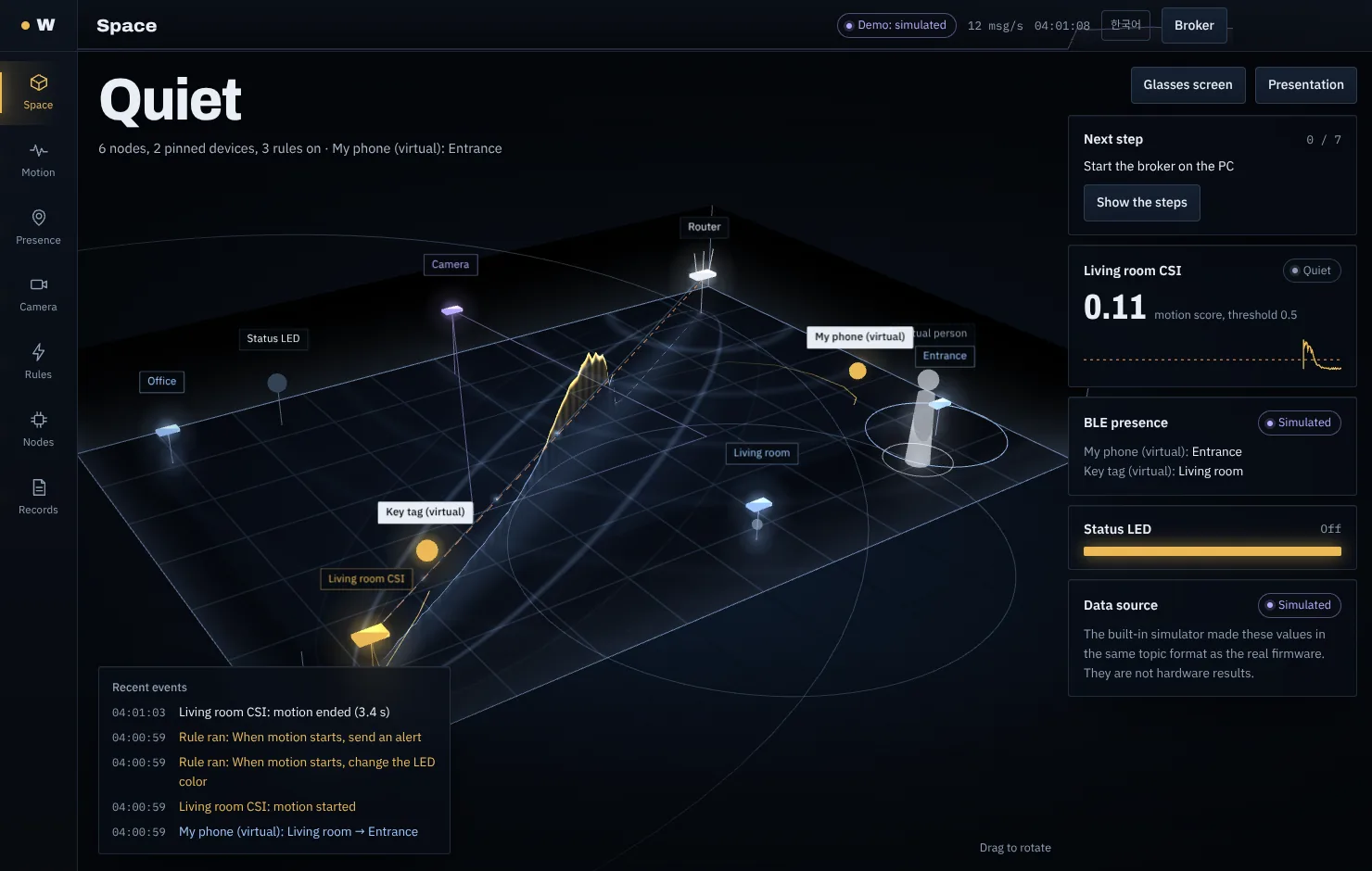
See what the boards sense, drawn in the room
The 3D view draws the sensing region of each Wi-Fi link on the floor and raises the last 14 seconds of motion score as a ribbon along the link. Bluetooth nodes and tracked devices appear in the same room.
One firmware per board, unmodified
Each firmware is flashed from its own web installer and reports over MQTT. Wavrel neither bundles nor changes them; it joins them at the message level. Start the app and the hub starts with it. The first-run screen asks for one thing, the hub password, and then shows what to enter on each board.
| Firmware | What it does | Board |
|---|---|---|
| ESPectre | Senses motion from Wi-Fi channel state information | ESP32-S3 |
| ESPresense | Measures Bluetooth distance, room by room | ESP32-S3, ESP32-C3 |
| Tasmota | Streams a small camera | ESP32-CAM |
| PIR sensor | Ground truth for validation | Wired to an ESPresense input |
Validation, not a feeling
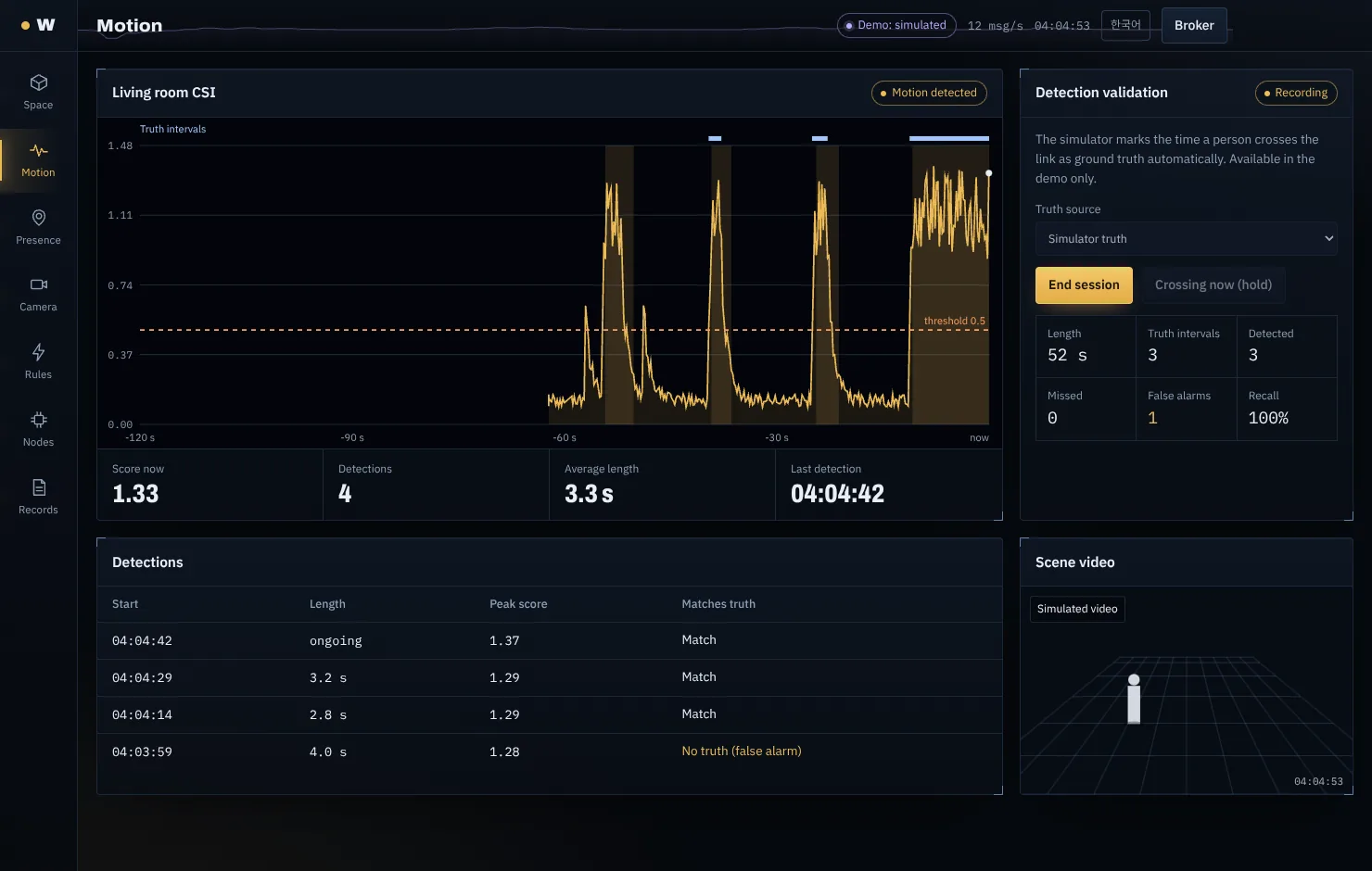
A validation session records when a person really crossed the link and matches it against what the firmware detected. Ground truth comes from a key you hold, a PIR sensor, or, in the demo only, the simulator.
- Hit
- Someone crossed and it was detected
- Miss
- Someone crossed and nothing was detected
- False detection
- Detected with nobody there
- Recall
- The share of crossings that were detected
Export the message log to replay it later, and hand over a standalone HTML report with the score curve of every session.
Alerts on your phone, then on your glasses
Rules and validation sessions turn what happened into one short sentence. A receiver needs nothing but an MQTT subscription to show it.
- The app writes a sentenceWhen motion starts on a link, a device enters a room, or a validation session counts a crossing.
- It goes out on one topicOnly the app can write to
lab/out/notify; boards can only read it. - Your phone receives itWavrel Relay, an Android app on the same Wi-Fi, shows it as a notification.
- Your Rokid glasses show itGreen on black, closed again after the alert's set time.
Attention · Simulated
Living room CSI: motion
Score 1.16 · threshold 0.5
9:41 PM
A drawing of what the glasses show. On the lens, black is transparent.
The phone app has been tested in an Android emulator in CI against Wavrel's own hub. It has not yet run on a real phone or real glasses.
It listens on your home network, so it is built defensively
- The window is sandboxed, loads only files shipped with the app, and reaches the system through eighteen validated calls.
- The hub requires a password and accepts private addresses only. Failed logins, connection count and message size are limited.
- The hub password is stored with Windows credential protection.
- The executable is locked down with Electron fuses. Every build audits dependencies and is scanned with Microsoft Defender.
What has been checked so far
Neither this site nor the repository claims a hardware result yet.
- Checked with the simulator
- Console views, PIR ground truth, replay, report, presentation mode, alert preview, glasses screen
- Checked by automated tests
- Data handling and session statistics, the embedded hub over real TCP sockets, the real app starting up, the Windows build and package, the English interface, phone alerts in an emulator
- Not done yet
- Measuring with real boards, alerts on a real phone and real glasses, installing from the Microsoft Store without a warning
Get it
-
Windows desktop app
0.6.2 · Windows 10, 11 (x64)Unzip and run
Wavrel.exe. There is no installer and no administrator prompt. The zip is not code-signed yet, so on first run Windows shows "Windows protected your PC": choose "More info", then "Run anyway". The Microsoft Store version, which installs without that warning, is in review. -
Wavrel Relay for Android
0.6.2 · Android 9 or laterShows the PC's alerts on Rokid glasses and lets you ask the PC out loud from the glasses. When Android asks, allow installing from this source. Later versions install over this one.
-
Browser demo
Nothing to installThe same console as the desktop app, running on the built-in simulator. Connecting to boards needs the desktop app.